
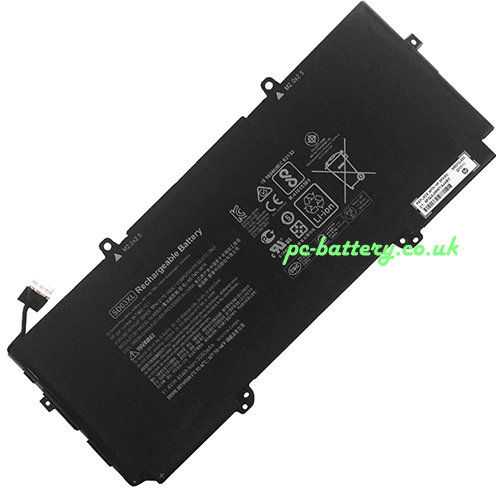
Replacement new Battery for HP Chromebook 13 G1 45Wh 11.4V
- 43.68GBP 55.66GBP
- Free delivery + 1-Year Warranty + 30 day money back!
-
Availability : In stock
Battery Type : Li-ion
Voltage : 11.4V
Capacity : 45Wh
Color : Black


Replacement new AC Adapter for HP Chromebook 13 G1 AC Adapter
- 27.69GBP47.6GBP
- Overvoltage and Overcurrent Protection Circuits built in ages your equipment !
-
Availability : In stock
Description
| Replacement for HP Chromebook 13 G1 battery rechargeable specifications | |
| Availability: | In stock |
| Battery Type: | Li-ion |
| Capacity: | 45Wh |
| Voltage: | 11.4V |
| Color: | Black |
Replacement laptop battery Chromebook 13 G1 give your notebook a second life, enabling you to work, watch videos or play games for many more hours between charges - just like when your laptop was new.
- ✔ battery for Chromebook 13 G1 have High-capacity, long battery life - 3800mAh for extended use between charges.
- ✔ Long service life at full power - battery uses Lithium cells without memory effect, for premium performance and increased lifespan.
- ✔ Certified safety and quality - CE & ROHS certified, Grade A laptop power bank with short-circuit, overheating and overvoltage protection.
- ✔ Thorough, comprehensive testing - each hp Chromebook 13 G1 battery cell is tested for optimum capacity and to ensure all safety requirements are met - all before installation.
Replacement HP Chromebook 13 G1 Battery Maintenance and User Instructions:
1) A new replacement new for original HP Chromebook 13 G1 battery pack needs to be circled (fully discharged and recharged) three to five times to reach its optimum performance.
2) Consider replacing the replacement new for original for hp Chromebook 13 G1 battery with a new one if you note either of the following conditions:
- The battery run time drops below about 80% of the replacement new for original run time.
- The battery charge time increases significantly
3)If a hp laptop battery is stored or otherwise unused for an extended period, be sure to follow the storage instructions in this document. If you do not follow the instructions, and the battery has no charge remaining when you check it, consider it to be damaged. Do not attempt to recharge it or to use it.Replace it with a new battery.
4) Laptop Battery Storage
- Remove the Battery for hp Chromebook 13 G1 and store it separately from the notebook,The battery self-discharges during storage.
- Charge or discharge the battery to approximately 50% of capacity before storage.
- Charge the battery to approximately 50% of capacity at least once every six months.
Payment by PayPal(our paypal account :service.order@outlook.com),
12-hour online service & email (Order@pc-battery.co.uk)response within 24 hours
,Guaranteed 1 year warranty,all our products come with an unconditional 60-day money-back guarantee.100% replacement manufacturer compatible.
.If your have any questions about the Replacement laptop battery, please directly Contact Us(Order@pc-battery.co.uk). We will reply within 24 hours.
Fit Machine Models:
- HP Chromebook 13 G1 Core m5
- HP Chromebook 13 G1
Compatible with numbers:
- HP 847462-1C1
- HP HSTNN-IB7K
- HP SD03XL
- HP TPN-Q176
