
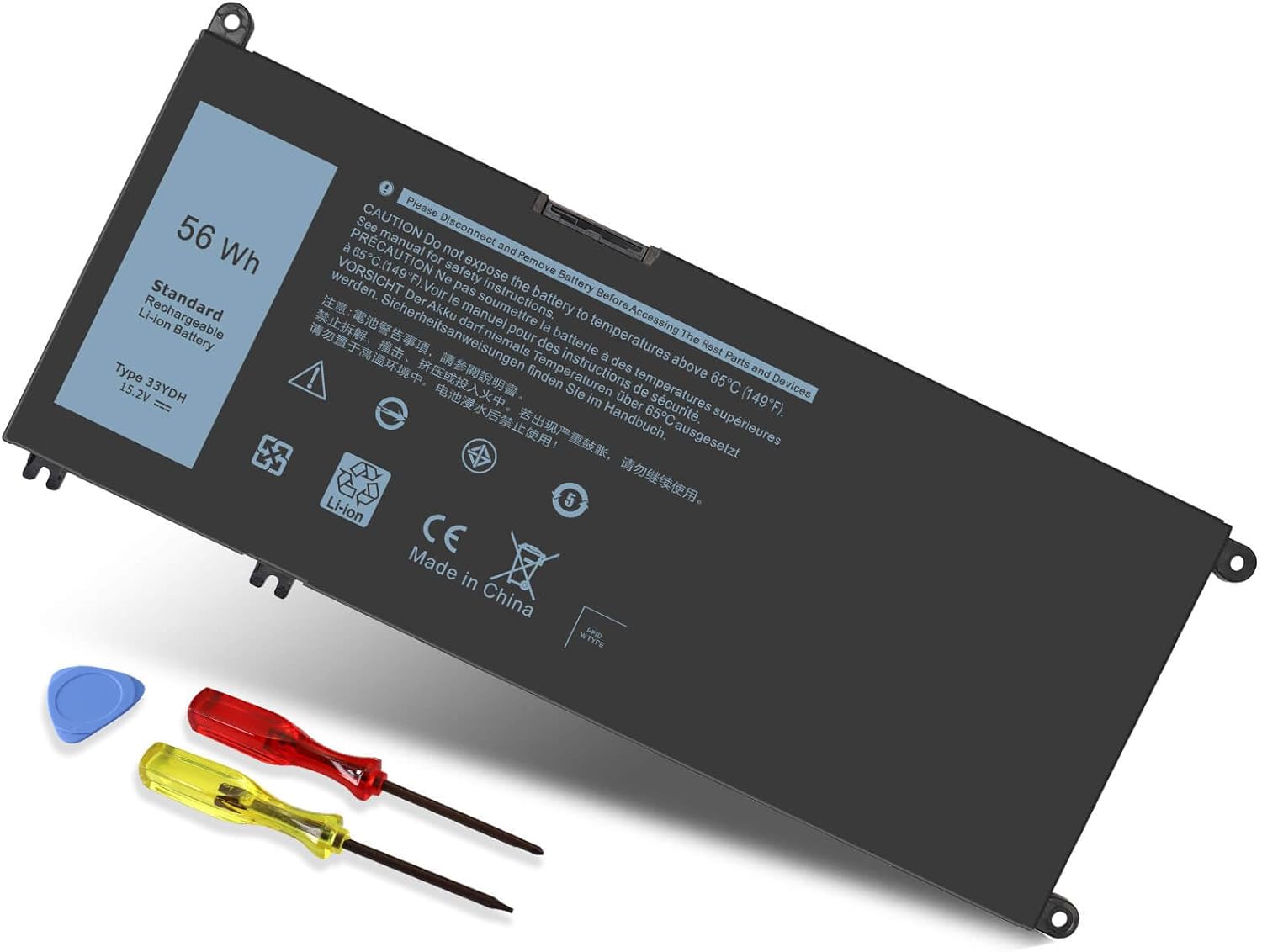
Replacement for dell latitude 15 3580 battery rechargeable 33YDH 15.2V 56Wh
-
Availability : In stock
Battery Type : Li-ion
Voltage : 15.2V
Capacity : 56Wh
Color : Black
No VAT Required,Payment by PayPal,1 years warranty, 60 days money back!
- There are 3 different type batteries,please check your original battery’s shape, size,capacity to make sure you get the correct replacement!

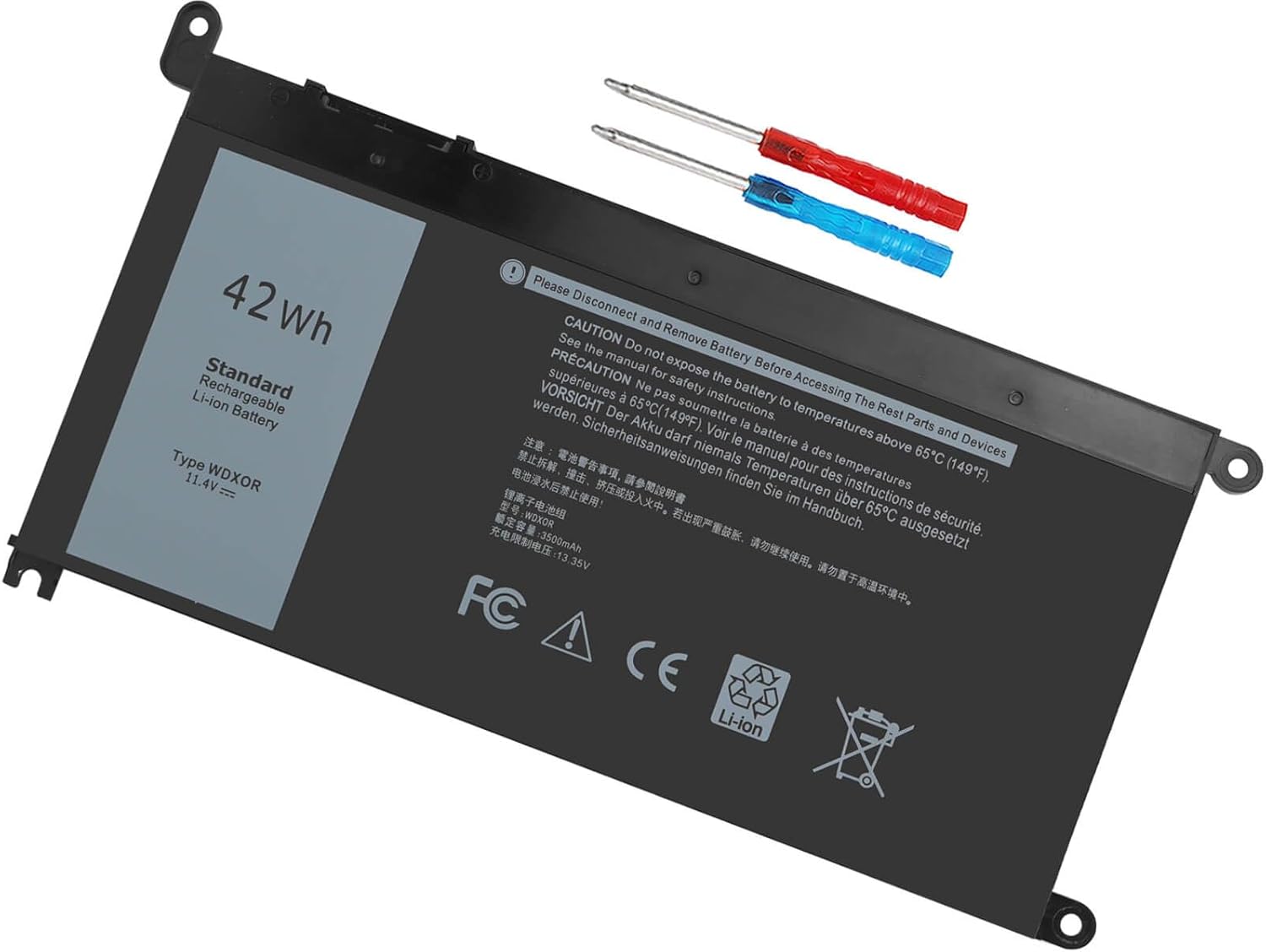
Replacement for dell latitude 15 3580 battery rechargeable WDX0R 11.4V 42Wh
-
Availability : In stock
Battery Type : Li-ion
Voltage : 11.4V
Capacity : 42Wh
Color : Black
No VAT Required,Payment by PayPal,1 years warranty, 60 days money back!
- There are 3 different type batteries,please check your original battery’s shape, size,capacity to make sure you get the correct replacement!
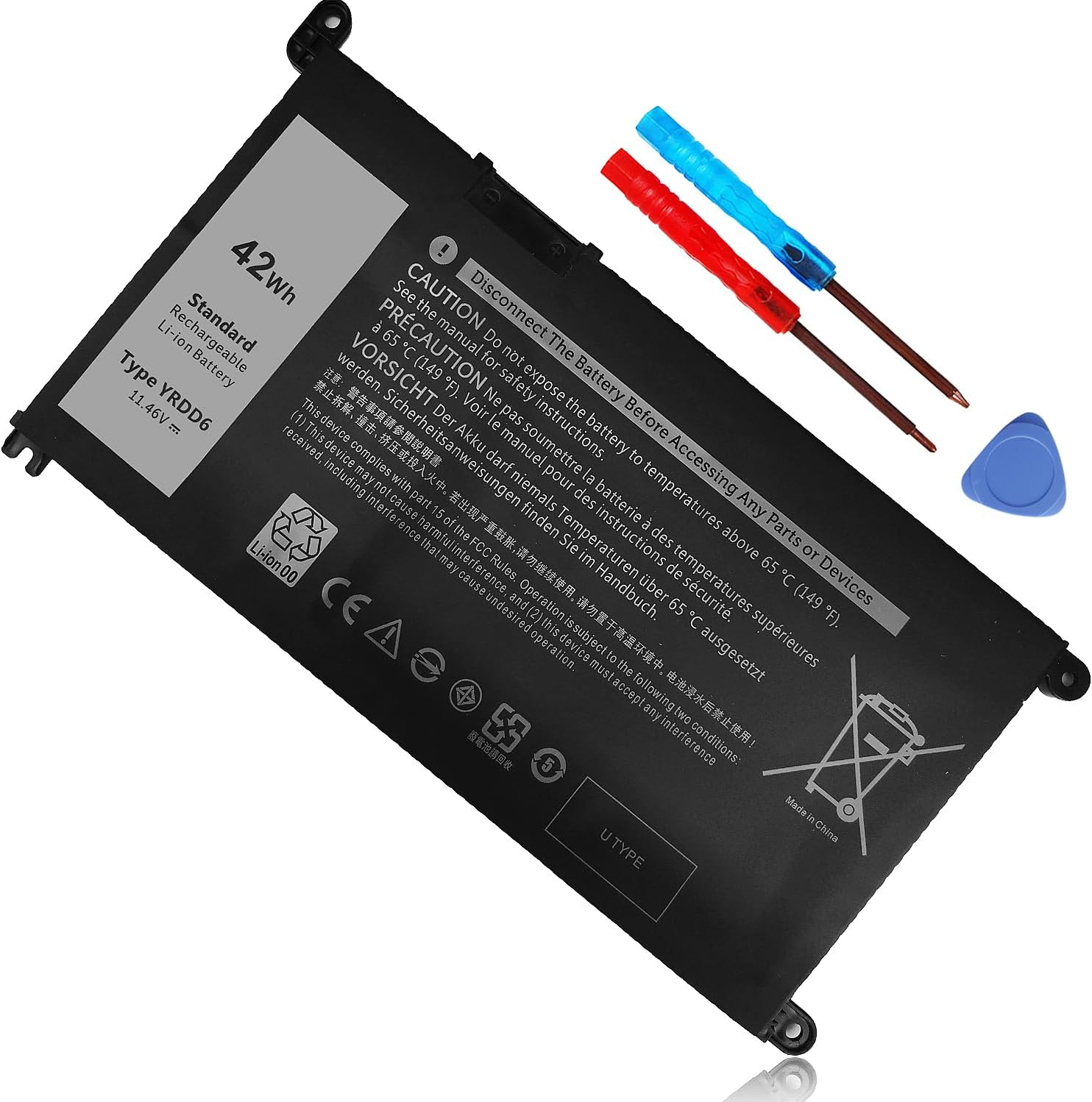
Replacement for dell latitude 15 3580 battery rechargeable YRDD6 42Wh
-
Availability : In stock
Battery Type : Li-ion
Voltage :11.4V
Capacity : 42Wh
Color : Black
No VAT Required,Payment by PayPal,1 years warranty, 60 days money back!
- There are 3 different type batteries,please check your original battery’s shape, size,capacity to make sure you get the correct replacement!
Description
| Replacement for Rechargeable/replacement DELL latitude 15 3580 battery specifications | |
| Availability: | In stock |
| Battery Type: | Li-ion |
| Capacity: | 42Wh /56WH |
| Voltage: | 11.4V/15.2V |
Replacement latitude 15 3580 6GTPY Battery for Dell XPS 15 9550 9560 9570 7590 Precision 5510 5520 5530 5540 Vostro 7500 7590,Replacement 4GVGH GPM03 M2X4 5XJ28 05XJ28 5D91C 1P6KD P56F P56F001 P56F002
(NOTE:There’re 3 different battery models. Please check your original battery’s shape, size, part number, capacity to make sure you get the correct replacement.
Note Before Purchasing We suggest you open your laptop case to check and confirm your original battery model and appearance, compared with our battery image, make sure that's what you need. Especially the connector location and type, the cable length (long or short etc).any questions,please contact us :Email:order@pc-battery.co.uk or live chat)
Replacement Dell Latitude 3580 Battery Review & Buyer Guide
The Dell Latitude 3580 is a 15.6-inch business and education laptop widely deployed in school fleets, offices and mobile field work. It came with two factory lithium-ion battery options, and the battery is the most frequently replaced FRU after years of repeated daily charging cycles. This guide includes official specs, hands-on runtime test, installation notes and complete FAQ.
Dell factory battery options for Latitude 3580 (also compatible with Latitude 3380, 3480, 3488, 3490, 3588, 3590):
- WDX0R (WDXOR, 42Wh, 3-cell, 11.4V Li-ion):Cross PN: 3CRH3, T2JX4, CYMGM, FC92N. Standard low-cost factory configuration
- 33YDH (56Wh, 4-cell, 15.2V Li-ion):Cross PN: PVHT1, 99NF2, 81PF3, 081PF3, 451-BCDN. High-capacity factory upgrade battery
Important reminder: WDX0R and 33YDH have different voltage, connector and mounting layout. They are NOT interchangeable. Not compatible with YRDD6, JK6Y6, G91J0, V6W33. Always verify the part number printed on your original battery before ordering.
Hands-on Product Review
We tested certified replacement WDX0R 42Wh and 33YDH 56Wh batteries on a Latitude 3580 configured with i5-8250U, 8GB DDR4 RAM, 256GB SSD, FHD non-touch screen, Windows 10 Pro. Screen brightness locked at 50%, Wi‑Fi enabled, standard room temperature.
Runtime Test Results (Brand New Certified Battery)
- Light office / class work (Docs, browser, online learning):
- 56Wh 33YDH: 5h 20min – 6h 10min
- 42Wh WDX0R: 4h 00min – 4h 50min
- Video conference & online meeting:
- 56Wh 33YDH: 3h 30min – 4h 10min
- 42Wh WDX0R: 2h 30min – 3h 10min
- Local 1080p video playback:
- 56Wh 33YDH: 5h 50min
- 42Wh WDX0R: 4h 30min
- PDF reading & note-taking:
- 56Wh 33YDH: 5h 40min
- 42Wh WDX0R: 4h 10min
- Sleep standby: ~1–2% drain overnight
An aged battery that only retains 30–40% capacity usually lasts merely 40–70 minutes under light office workloads. Dell’s official marketing battery life data is captured under low-power lab conditions and cannot be achieved in real mixed daily use.
What we like about certified replacement batteries
- Accurate smart communication chip: Windows battery percentage, BIOS battery info and Dell SupportAssist health readings display correctly. No random percentage drops or “battery not recognised” alerts.
- ExpressCharge supported: With a genuine Dell 65W 7.4mm barrel charger, a healthy battery can reach 80% charge within roughly 60 minutes.
- Stable discharge curve: No sudden hard shutdown at 10–20% remaining charge, a common flaw of cheap generic batteries without qualified BMS protection.
- Exact OEM shape, mounting holes and connector: Direct drop-in fit after removing the bottom base cover, no cutting or modification required.
Weaknesses & Important Caveats
- The battery model:: 42Wh WDX0R and 56Wh 33YDH. They are not interchangeable; no higher-capacity official battery beyond 56Wh for this chassis.
- WDX0R / 33YDH also fit Latitude 3380, 3480, 3488, 3490, 3588, 3590. Not compatible with YRDD6, JK6Y6, G91J0 or V6W33. Always match the PN from your old battery label before ordering.
- Standard version rated cycle life is approximately 300 full charge cycles; LLC long-life cycle variant supports up to 1000 cycles. After cycles are exhausted, usable capacity will gradually decline.
- Installation requires removing the bottom base cover. Before touching internal parts, power off the laptop, unplug the barrel charger, disconnect the battery cable and press the power button for 10 seconds to release residual static power. Never bend, twist or puncture the lithium-ion cell.
- Swollen batteries are hazardous. Stop using the laptop immediately if you spot bulging, warped bottom cover or lifted trackpad. Do not squeeze, pierce or attempt to charge a swollen battery. Deliver it to a professional lithium battery recycling station.
Battery Maintenance Tips
- Use the original Dell 65W 7.4mm barrel AC adapter. Higher-wattage Dell barrel adapters work, but low-quality unbranded adapters may trigger slow charging or charging failures.
- Avoid draining the battery down to 0% frequently. Deep discharge damages the protection board and shortens service life.
- If you keep the laptop docked and plugged in all day, use Dell Power Manager to set a charge limit at 60–80% to slow battery aging.
- Run battery diagnostics in SupportAssist or use powercfg /batteryreport in Windows Command Prompt to track capacity degradation.
- Keep the laptop away from high heat, direct sunlight or soft cushions while charging; heat is the top cause of lithium-ion battery degradation.
FAQ for replacement Dell Latitude 3580 Battery
Q1: Which battery part numbers fit Latitude 3580?
A: Two separate options (not interchangeable):
- WDX0R / WDXOR / 3CRH3 / T2JX4 / CYMGM / FC92N (42Wh, 3-cell, 11.4V Li-ion)
- 33YDH / PVHT1 / 99NF2 / 81PF3 / 081PF3 / 451-BCDN (56Wh, 4-cell, 15.2V Li-ion) Also compatible with Latitude 3380, 3480, 3488, 3490, 3588, 3590. Not compatible with YRDD6, JK6Y6, G91J0 or V6W33.
Q2: Can I upgrade from WDX0R 42Wh to 33YDH 56Wh for longer runtime?
A: No. They have different voltage, connector and mounting structure. You must install the exact same PN as your original battery.
Q3: My Latitude 3580 only runs when plugged in, Windows shows 100% battery. Is the battery dead?
A: This is a classic failure symptom. First run Dell SupportAssist battery diagnostics and check battery data in BIOS. If the diagnostic marks the battery failed, replacement is needed. Rarely, this issue can also be caused by a loose battery connector or faulty charging circuit.
Q4: Can I replace the battery myself?
A: It is internal and non-hot-swappable FRU. You need to remove the base cover, disconnect the battery cable and remove fixing screws. If you lack electronics repair experience, hire a professional technician. Always power off and unplug the charger before disassembly.
Q5: Do WDX0R and 33YDH support ExpressCharge?
A: Original OEM WDX0R and 33YDH support ExpressCharge. Only certified replacement batteries with the correct smart communication chip support fast charging. Cheap generic batteries usually skip this function and charge slowly.
Q6: How do I check my battery health?
A: Two reliable ways:
- Press F2 during boot to enter BIOS and open the Battery Information page.
- Open Command Prompt and run powercfg /batteryreport, or launch SupportAssist to run the battery hardware scan.
Q7: What charger should I use for Latitude 3580?
A: Dell original 65W 7.4mm barrel AC adapter is recommended. This model uses barrel charging, USB‑C chargers are not supported.
Q8: How many cycles can I expect from a new replacement battery?
A: Standard version: around 300 full charge cycles. LLC long-life version: up to 1000 cycles. With light daily use and proper care, standard version can stay usable for roughly 2–3 years before capacity drops noticeably.
Q9: Is it safe to leave the laptop plugged in 24/7?
A: Dell firmware stops charging once full. However, keeping the battery at 100% under warm conditions accelerates aging. If the laptop stays docked long-term, set a charge limit via Dell Power Manager whenever possible.
Q10: What should I do if my battery is swollen?
A: Stop using the laptop right away. Disconnect the power adapter. Do not squeeze, puncture or force the battery out. Take it to a repair shop or authorised e-waste recycling centre for safe disposal.
Why select replacement dell latitude 15 3580 laptop battery from us?
- 1. In addition to the inbound inspection, the dell latitude 15 3580 battery will be rigorously tested by our professional engineers again to ensure safety and fullness before shipment
- 2. All pictures are not edited, what you see on website is exactly what you will receive
- 3. Over 8 years of experience sale online,60 days money back
- 4. We have shipped to over 70 countries worldwide, and 50000+ orders
.If your have any questions about the Replacement laptop battery, please directly Contact Us(Order@pc-battery.co.uk). We will reply within 24 hours.
Fit Machine Models:
- 7FHHV
- G3 15 3579
- G3 17 3779
- G3 3579
- G3 3779
- Inspiron 15 7588
- Inspiron 15 GAMING 7577
- Inspiron 15(7577)
- Inspiron 15-7577
- Inspiron 17 7773
- Inspiron 17 7773 2-IN-1
- Inspiron 17 7778 2-IN-1
- Inspiron 17 7779 2-IN-1
- Inspiron 17(7778)
- Inspiron 17-7778
- Inspiron 17-7779
- Inspiron 7773
- Inspiron 7778
- Inspiron 7779
- Inspiron 7786
- Inspiron G7 7588
- Latitude 13 3380
- Latitude 14 3480
- Latitude 14 3488
- Latitude 15 3580
- Latitude 3380
- Latitude 3480
- Latitude 3488
- Latitude 3580
- Vostro 15 7570
- Chromebook 3110
- Chromebook 3110 2-IN-1
- Inspiron 15 5582
- Inspiron 15 5582 2-IN-1
- Inspiron 15 5584
- Inspiron 15 5585
- Inspiron 5481
- Inspiron 5481 2-IN-1
- Inspiron 5482
- Inspiron 5485
- Inspiron 5486
- Inspiron 5486 2-IN-1
- Inspiron 5493
- Inspiron 5494
- Inspiron 5580
- Inspiron 5590
- Inspiron 5591 2-IN-1
- Inspiron 5593
- Inspiron 5594
- Inspiron 5598
- P118G
- P118G001
- P77F
- P77F001
- P90F003
- P90F004
- P90F006
- Vostro 3401
- Vostro 3501
- Vostro 5490
- Inspiron 13 (5378)
- Inspiron 13 (7378)
- Inspiron 13 5379 2-IN-1
- Inspiron 14 7472
- Inspiron 15 (5565)
- Inspiron 15 (5567)
- Inspiron 15 5565
- Inspiron 15 5567
- Inspiron 15 5568 2-IN-1
- Inspiron 15 7560
- Inspiron 15-5568
- Inspiron 17 (5765)
- Inspiron 17 (5767)
- Inspiron 3482
- Inspiron 3583
- Inspiron 5565
- Inspiron 5575
- Inspiron 5579
- Inspiron 5583
- Inspiron 5765
- Latitude 13 3379 2-IN-1
- Latitude 3180
- Latitude 3190
- P86F
- P88G001
- P89G004
- Vostro 15 (5568)
- Vostro 15-5568
- Vostro 3581
- Vostro 3590
Compatible with numbers:
- 33YDH
- 4WN0Y
- P79G
- P71F002
- P75F003
- P89G001
- P72F001
- P72F002
- P71F
- P79G001
- 81PF3
- P71F001
- P35E003
- P30E
- P72F
- 081PF3
- P36E
- PVHT1
- P36E001
- T79G001
- P89G
- T79G
- P30E001
